

Introduction
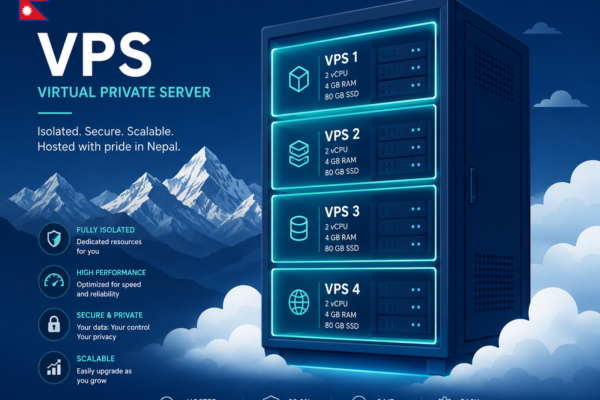
VPS security remains a foundational element of reliable digital infrastructure. Threat actors increasingly target misconfigurations, weak access controls, and unpatched software, underscoring the need for proactive defenses. A well-hardened VPS reduces exposure to brute force attempts, data breaches, and service interruptions. As attack surfaces evolve, organizations should adopt a systematic approach to server hardening that combines access control, network defenses, and continuous monitoring, delivering a more predictable security posture and improved resilience against evolving threat vectors.
Why hardening matters for Nepal-based hosting
For Nepal-based hosting, considerations include variable network reliability, regulatory nuances, and regional cyber threat activity. Implementing robust hardening practices helps organizations maintain uptime and protect customer data, even under local constraints. A secure VPS aligns with Linux security best practices, supports compliance requirements, and enhances trust with clients who expect private, reliable hosting environments.

A disciplined hardening workflow also reduces incidental exposure during migrations to public cloud or hybrid configurations. The following guide outlines practical, actionable steps to elevate VPS security without introducing unnecessary complexity. Readers will learn how to balance strong protections with maintainable operations, ensuring secure VPS server management across common Linux distributions such as Ubuntu, Debian, and CentOS.
This approach reflects standard industry guidance while remaining accessible to developers, system administrators, and small business owners who rely on VPS hosting. Throughout, examples reference widely used tools and configurations to support secure SSH access, network defenses, and ongoing monitoring.
1. Use Strong Passwords and Enable Two-Factor Authentication

Strengthening authentication controls is a fundamental step in securing a VPS. Relying on simple credentials leaves servers vulnerable to automated credential stuffing and credential theft. Implementing robust passwords and an additional factor for access reduces the probability of unauthorized login attempts and contributes to overall VPS security.
Password hygiene steps
Enforce minimum length and complexity for all accounts, including a mix of upper- and lower-case letters, numbers, and special characters. Avoid reusing passwords across services to limit the blast radius of a credential leak. Introduce password aging policies that require periodic changes, while avoiding overly aggressive rotation that leads to insecure workarounds.
Use passphrases where suitable to improve memorability without compromising strength. Store credentials securely using a password manager for administrators and ensure backups are protected. For operations requiring automated tooling, keys and tokens should replace plain passwords where feasible. When password-based access remains necessary, ensure auditing and monitoring are in place to detect unusual authentication events and to respond promptly.
Setting up two-factor authentication for server access
Two-factor authentication adds a second verification layer beyond something the user knows. This significantly raises the bar for account compromise. Implementing 2FA for SSH or administrative interfaces helps secure administrative access to the VPS. Choose a 2FA method that integrates with your authentication flow, such as time-based one-time passwords (TOTP) or hardware security keys, where supported.
Configure the authentication service to require the second factor for privileged accounts without disrupting legitimate administrative tasks. Test the 2FA workflow under controlled conditions before enforcing it across the environment to avoid accidental lockouts. Document the 2FA process and establish a recovery procedure for lost devices or keys.
Implementation commonly involves updating PAM or SSH authentication modules to require an additional factor for login attempts. The result is a more resilient baseline against unauthorized access while maintaining operational accessibility for legitimate administrators.
2. Implement SSH Key-Based Authentication and Disable Password Logins
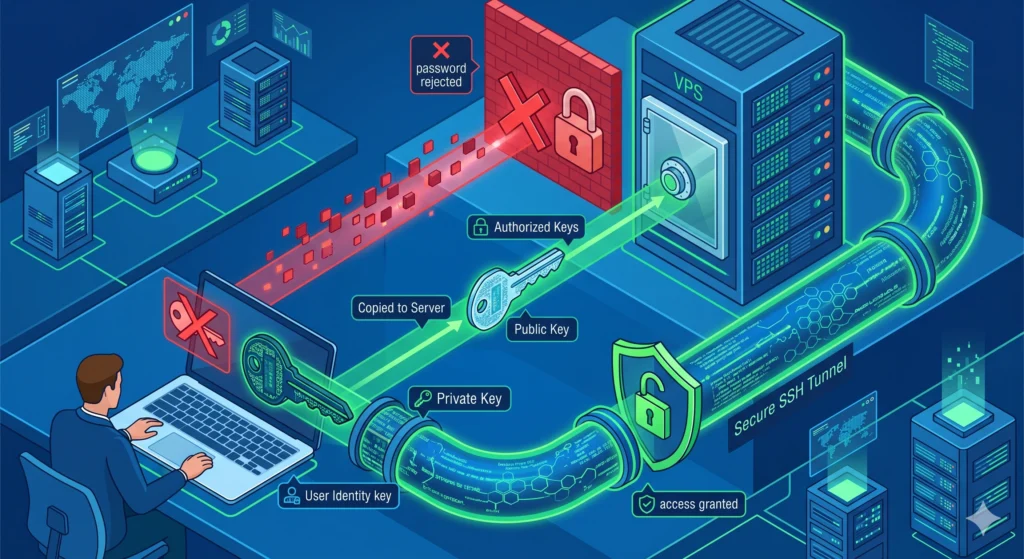
SSH key-based authentication strengthens access control by replacing passwords with cryptographic keys. This approach reduces the attack surface for administrative access to a VPS while preserving secure, convenient logins for authorized users.
Generating and distributing keys
Begin by generating an SSH key pair on the administrator’s workstation. The private key remains on the client, while the public key is placed on the server to authorize access. Use a strong, modern algorithm and protect private keys with a passphrase where feasible. On Linux or macOS, generate a key pair with ssh-keygen -t ed25519 -a 100. For compatibility with older clients, ssh-keygen -t rsa -b 4096 remains an option, though ed25519 is preferred for speed and security.
Distribute the public key to the server by appending it to ~/.ssh/authorized_keys of the target user. Use a secure transfer method or a trusted configuration management tool. Ensure the server-side permissions are correct: chmod 700 ~/.ssh and chmod 600 ~/.ssh/authorized_keys.
Configuring SSH for key-only access
Configure the SSH daemon to accept key-based authentication and disable password login. This strengthens VPS security by ensuring only holders of the private key can authenticate.
- Edit the SSH configuration: sudo sed -i ‘s/^#? PasswordAuthentication yes/PasswordAuthentication no/’ /etc/ssh/sshd_config
- Ensure public key authentication is enabled: sudo sed -i ‘s/^#? PubkeyAuthentication yes/PubkeyAuthentication yes/’ /etc/ssh/sshd_config
- Restrict user access to specific accounts if needed by adding AllowUsers or AllowGroups in /etc/ssh/sshd_config.
- Reload the SSH service to apply changes: sudo systemctl reload sshd
After these steps, test a login using the private key from a trusted client before closing any existing password-based session. This confirms ongoing access and verifies the configuration, contributing to a robust VPS security posture.
3. Create a Non-Root Administrative User and Apply Least Privilege
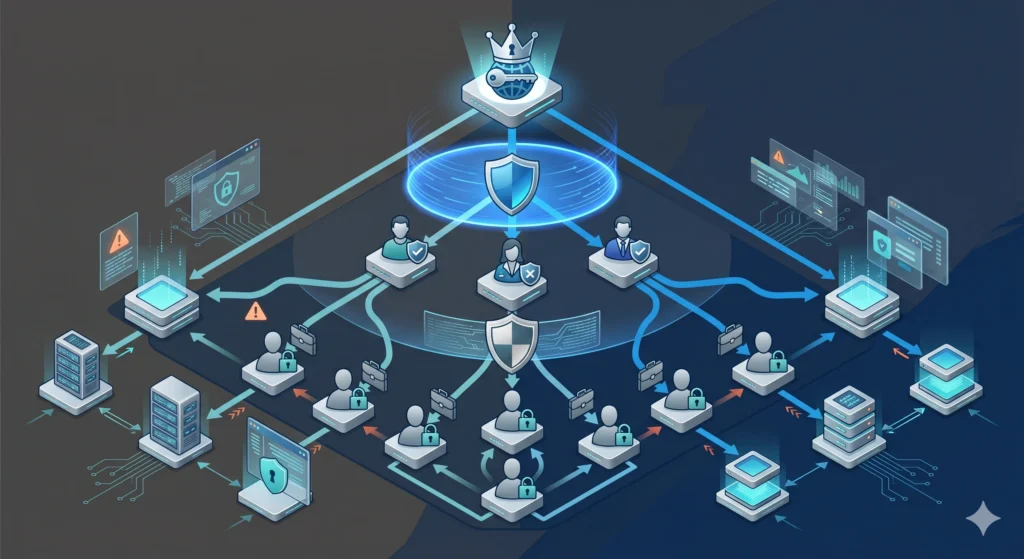
Establishing a dedicated administrative account separate from the root user reduces risk by limiting the scope of privileged actions. This approach aligns with the principle of least privilege, ensuring users have only the permissions necessary to perform their tasks. Implementing non-root administrative accounts also improves auditability and accountability for administrative actions on a VPS.
Creating restricted users
Begin by adding a new user with limited default permissions, then assign it to the appropriate groups. This creates a verifiable boundary between daily operations and elevated tasks. Use a strong, unique username and configure the environment to support secure administration.
- Create a new user: sudo adduser adminuser
- Assign the user to the sudo group for controlled elevation: sudo usermod -aG sudo adminuser
- Set a strong password and consider SSH key authentication for the new account to improve SSH security
Sudo access best practices
Granting sudo access should be deliberate and limited to trusted administrators. Implementing precise sudo rules reduces the risk of unintended system changes while maintaining operational efficiency. Documented policies help teams understand permissible actions and support compliance requirements.
| Approach | Benefit | Considerations |
| Full sudo access for admins | Convenient elevation for routine tasks | Increases potential for misuse; requires monitoring |
| Granular sudo rules | Restricts commands by user or group | Requires initial setup and maintenance |
| Role-based access control (RBAC) on services | Least-privilege alignment per service | More complex to implement, but improves security posture |
Implement a minimal sudoers configuration that allows only essential commands for routine administration. For example, restrict non-root users to specific system management tasks and prevent passwordless sudo except for explicitly approved cases. Regularly review sudoers files to confirm alignment with current responsibilities and security requirements.
By combining a non-root administrative account with disciplined sudo practices, you strengthen VPS security and support a more robust Linux security posture. This foundation also simplifies accountability when monitoring SSH access and administrative activity across the server environment.
4. Change the Default SSH Port and Harden SSH Configuration
Why change ports?
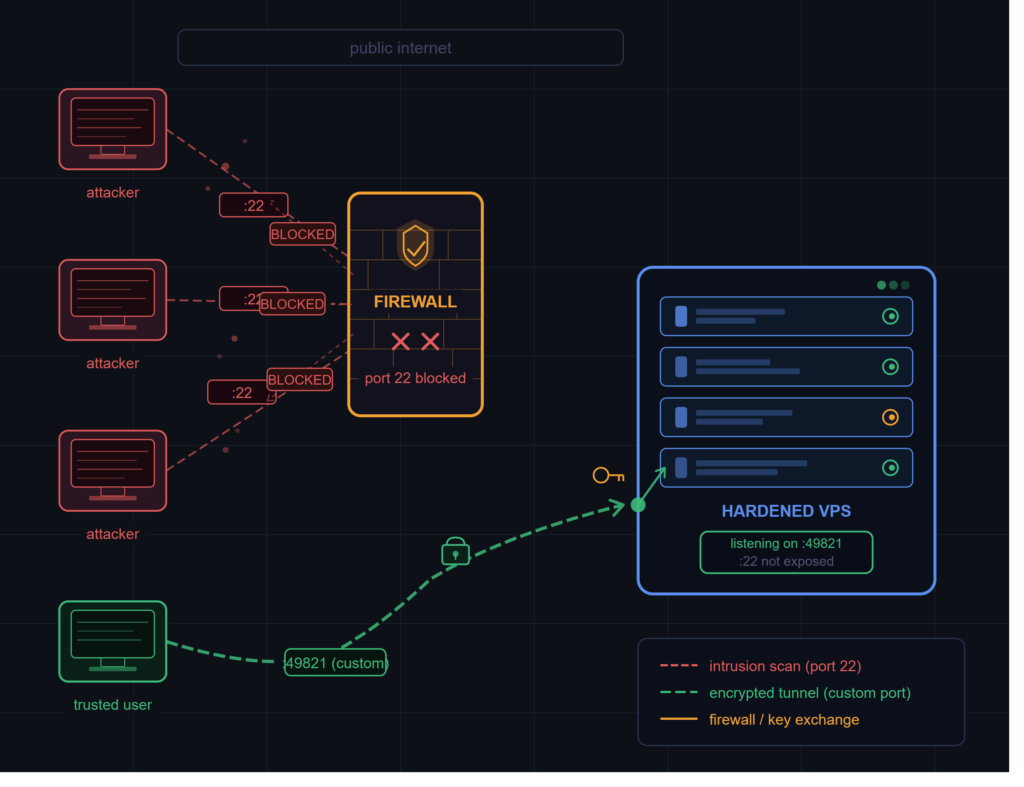
Changing the default SSH port reduces exposure to automated scanning and opportunistic attacks that target port 22. While not a complete security measure, it adds a layer of obscurity that slows automated tools and lowers noise in login attempts. This practice complements other hardening steps without affecting legitimate administration workflows when documented and communicated to the team.
Many hosting environments and control panels allow administrators to set a custom port for SSH access, which can help segregate administrative traffic from general services. It is important to update firewall rules and management tooling to reflect the new port, ensuring legitimate connections remain uninterrupted. This change should be integrated into a broader defense in depth strategy for VPS security.
SSHConfig tuning tips
Hardening the SSH daemon involves configuring the server to require stronger authentication, reduce exposure, and enforce consistent security policies. The following adjustments are recommended for most Linux distributions used in VPS environments.
- Set a non-standard port in /etc/ssh/sshd_config using the Port your_custom_port.
- Disable root login by setting PermitRootLogin to no to prevent direct privileged access.
- Restrict authentication methods to public key authentication by specifying PubkeyAuthentication yes and PasswordAuthentication no.
- Limit user logins with AllowUsers or AllowGroups to reduce exposure to unknown accounts.
- Enable X11Forwarding only when required to minimize potential risk vectors.
- Enforce protocol 2 for stronger security by including Protocol 2 in the configuration.
After making changes, validate by initiating a new session from a trusted client. Confirm that the old port no longer accepts connections from external networks, while the new port remains accessible to authorized systems. Reload the SSH service to apply updates and monitor authentication events in the system logs.
These steps contribute to a hardened SSH configuration that supports secure VPS server practices and ongoing Linux security hardening efforts.
5. Establish a Firewall and Intrusion Prevention (Fail2ban/Crowdsec)
Setting up a host-based firewall
A host-based firewall remains a foundational layer by controlling inbound and outbound traffic at the server boundary. It reduces exposure to unauthorized connections and supports network segmentation for VPS security. A well-configured firewall permits only essential services and defaults to blocking other traffic.
On Ubuntu or Debian systems, the uncomplicated firewall (UFW) offers a streamlined interface for administrators. For CentOS or RHEL environments, firewalld provides a dynamic alternative with zones and rich rule sets.
- Identify necessary open ports based on services running on the VPS.
- Implement a default deny policy for inbound traffic.
- Persist rules across reboots to maintain a consistent security posture.
Installing and configuring Fail2ban or Crowdsec
Fail2ban and Crowdsec deliver intrusion prevention by monitoring logs and dynamically banning suspicious IPs after repeated failed attempts. This automated defense reduces the risk of brute force campaigns targeting SSH and web services. Select the solution that aligns with your monitoring preferences and ecosystem integration.
| Aspect | Fail2ban | Crowdsec |
| Detection | Monitors log files and applies bans based on jail rules | Collects telemetry from agents and uses community-enabled scanners |
| Configuration | Jail-based; straightforward for SSH and HTTP | Agent-driven; scalable across multiple hosts |
| Integration | Widely supported in Linux stacks | Growing ecosystem with community rules |
Fail2ban setup typically involves installing the package and enabling SSH and web jails, followed by editing the jail.local to tailor ban thresholds. CrowdSec requires installing the CrowdSec package, enabling local policies, and joining the CrowdSecurity community for shared sensor rules. Both tools provide log viewing commands to verify active bans and to inspect ban histories.
Validation steps include testing a few failed login attempts from a controlled client, then confirming that the tool blocked the originating IP. Regularly review ban lists to avoid inadvertent lockouts from legitimate users and ensure service accessibility remains intact.
6. Keep System and Software Up to Date with Automated Updates
Maintaining current software remains a foundational element of VPS security. Regular updates close known vulnerabilities and reduce exposure to exploit kits targeting unpatched components. Automated update mechanisms help ensure critical patches are applied promptly, even when manual oversight is limited. This practice supports a secure VPS server by aligning with standard Linux security hardening procedures and trusted hosting standards.
Scheduling regular updates
Establish a predictable update cadence that fits the server role and downtime constraints. For production environments, a staged approach minimizes disruption while preserving protection. Consider automated daily checks for kernel and package updates, with a separate maintenance window for reboots if necessary.
Enable automatic updates for security patches where available while deferring less critical releases during high-traffic periods. Reuse a testing or staging environment to validate updates before deployment to production systems. Document the update schedule and any exceptions to maintain traceability for auditing purposes.
Managing repositories and patches
Proper repository management ensures access to trusted sources and mitigates supply-chain risks. Configure only vetted repositories and verify package signatures to prevent tampering. Regularly review enabled sources to avoid drift from official distributions.
- On Debian-based systems, monitor /etc/apt/sources.list and /etc/apt/sources.list.d for accurate entries.
- On Red Hat-based systems, confirm enabled repos via yum/dnf and disable deprecated channels.
- Enable automatic security updates explicitly while keeping optional updates under administrative review.
Automatic updates should be complemented by routine verification of the update logs to detect failed installations or conflicts. Reboot management is essential when kernel updates occur; ensure a reboot plan is in place to minimize service disruption and maintain kernel-level protections. This approach supports ongoing VPS security and aligns with best practices for Linux security in common distributions.
7. Encrypt and Secure Data with SSL/TLS and Database Protections
Encryption remains a cornerstone of VPS security, safeguarding data in transit and at rest from eavesdropping and tampering. Proper SSL/TLS certificate management ensures confidential and authenticated client-server communications, while protections for databases help prevent unauthorized data exposure. Integrating certificate handling with database security supports consistent data integrity across services and applications.
Acquiring and deploying certificates
Public key infrastructure establishes trust for encrypted connections. Obtain certificates from reputable authorities or leverage free alternatives that verify domain ownership. Deploying certificates correctly reduces the risk of man-in-the-middle attacks on web services and APIs. For web servers, enable current TLS protocols and disable deprecated options to minimize vulnerability exposure.
- Choose a trusted certificate authority with reliable renewal workflows.
- Utilize automation tools to issue and renew certificates where supported by the environment.
- Configure the web server to prefer strong ciphers and implement HTTP Strict Transport Security (HSTS) to enforce secure connections.
Automation is essential for maintaining valid certificates. Establish renewal checks and monitor expiration notices to avoid service interruptions. For non-web services, consider mutual TLS where appropriate to authenticate clients and servers within private networks. Ensure private keys are stored securely with restricted access.
Database access controls and encryption
Databases house sensitive information and require both access control and encryption. Implement role-based access control to grant only necessary privileges. Enable encryption at rest where supported, and enforce encrypted connections for all client applications to protect data in transit.
- Apply strong authentication for database clients and avoid embedding credentials in code or configuration files.
- Isolate database services from public networks and limit exposure to trusted hosts or VPNs.
- Regularly rotate credentials and periodically review user permissions to prevent privilege creep.
When configuring SSL/TLS for database connections, validate certificates for each connection and disable insecure protocols or legacy modes. This integrated approach to SSL/TLS and database protections supports a comprehensive VPS security posture across mixed environments.
FAQ
What is VPS security, and why does it matter?
VPS security encompasses the practices and configurations that protect a virtual private server from unauthorized access, data leakage, and service disruption. A well-secured VPS reduces exposure to common attack vectors such as brute force login attempts, outdated software, and misconfigurations. Effective security relies on robust access controls, network hardening, timely patching, and continuous monitoring to maintain integrity and availability.
What is the first thing I should do to secure my VPS?
Begin with a baseline of access control and remote access hardening. Create a non‑root administrative user with sudo privileges, disable password login in favor of SSH key authentication, and relocate the default SSH port away from 22. This approach reduces the most common entry points for attackers and supports ongoing hardening efforts.
Is SSH key authentication really safer than a password?
SSH key authentication is generally safer because it relies on cryptographic keys that are harder to guess or steal than passwords. Keys are protected by a passphrase and reside on the client device, while the server validates possession of the corresponding public key. This reduces successful brute force attempts and mitigates risks associated with weak passwords.
Which firewall should I use, UFW or iptables?
Both can provide effective protection when configured correctly. UFW offers a user-friendly interface suitable for standard deployments, while iptables provides granular control for more complex environments. Begin with UFW for straightforward rule sets and consider iptables if advanced traffic shaping or multi‑layer policies are required.
What does Fail2Ban do, and is it necessary?
Fail2Ban analyzes log files to identify repeated failed login attempts and temporarily blocks offending IP addresses. It adds an automated layer of defense against brute force attempts on SSH and other services. While not strictly mandatory, it is a widely adopted, low‑overhead element of a layered VPS security strategy and complements key authentication and firewall controls.
Conclusion
The conclusion reiterates the need for a structured approach to VPS security and reiterates the importance of both immediate hardening actions and sustained governance. Such practices allow for a multi-layered defense that can respond to the evolving nature of threats and the changing needs of infrastructure.
Security is a process, not a destination. Regular reviews, updates and ongoing monitoring are critical. Automated safeguards like key-based authentication, strong firewall configuration and proactive log analysis help maintain a vigilant security posture while reducing the administrative burden.
We encourage readers to assess their existing deployments, collaborate with trusted hosting partners to implement the right solutions, and remain vigilant for continuous enhancements to their secure VPS environment over time.